
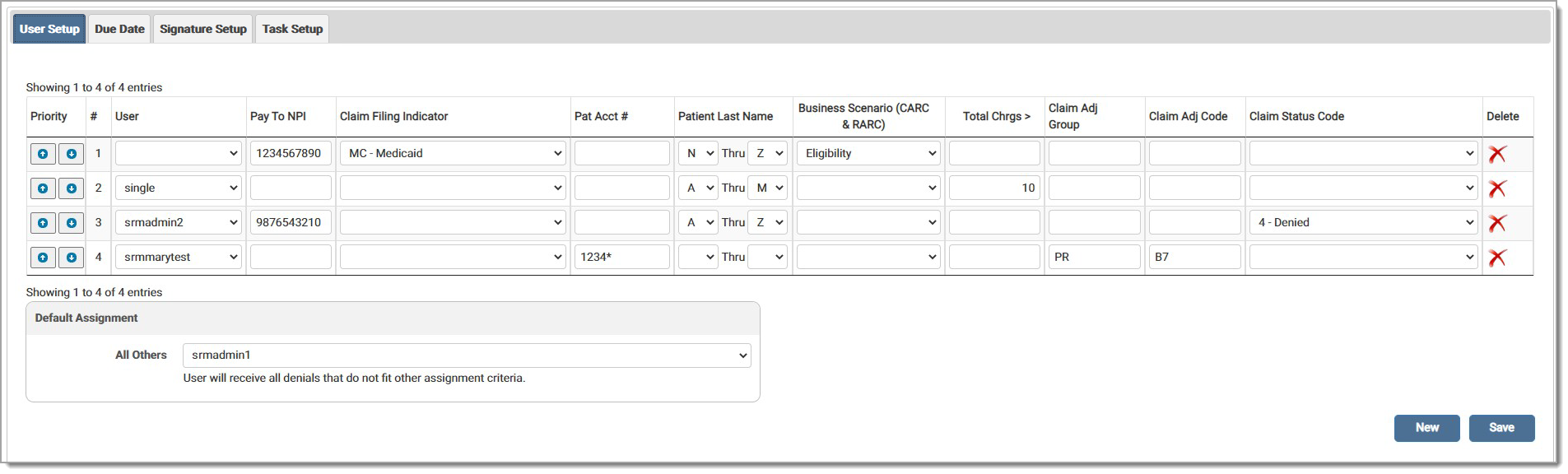
The User Setup feature allows administrators to assign denials to different users. Users may select various options and combinations from this list and customize the setup as needed. The following options are available:
Click the drop-down arrow to make selection(s) for each category for each User. Priority should be assigned after selecting all the criteria. Click the arrows to move the user(s) up or down the list.
In the Patient Account Number field, enter an asterisk (*) for the wild card and any other relevant character needed for the search. Searches can include special characters such as dashes and spaces.
Enter a whole dollar amount in the Total Charges Greater Than (Total Chrgs >) field to add all claims with one penny over the specified dollar amount to the queue. An error message displays if the data entered is invalid.
Users may work specific codes for denials by entering Claim Adjustment Group Codes (Claim Adj Group) and/or Claim Adjustment Reason Codes (Claim Adj Code).
Select a Claim Status Code from the drop-down menu.
Select the Default Assignment user from the drop-down menu. The user selected receives all remits that do not fit the assignment criteria.
Click New to add a blank line to the grid. To delete a line, click the red X in the Delete column. Click Save to save any changes made to the setup.
eMEDIX Online | Published: 2026.02.12 | ©copyright 2026 CompuGroup Medical, Inc. – All rights reserved.